

Artificial intelligence is no longer a futuristic concept for the legal industry—it’s here, reshaping how legal professionals research, review, and manage knowledge. One of the most powerful tools in this revolution is Google NotebookLM. This AI-powered, source-grounded research assistant is tailor-made for professionals who work with large document sets. In this guide, we’ll break down step by step how to use NotebookLM for Lawyers, its benefits, and why law firms should take notice.
What is NotebookLM?
Google NotebookLM is an AI-driven research and note-taking platform powered by Gemini 1.5. Unlike traditional AI tools, NotebookLM only uses the documents you upload—ensuring source-grounded, verifiable insights. This makes it perfect for lawyers who require accuracy, confidentiality, and direct citations.
Key features at a glance:
- Upload PDFs, Google Docs, text files, URLs, YouTube videos, and audio recordings
- Generate summaries, timelines, mind maps, and even audio overviews
- Provide clickable citations linked directly to your uploaded materials
- Supports up to 50 sources per notebook in the free plan and up to 300 in the Pro plan
By leveraging NotebookLM, lawyers can streamline everything from discovery review to contract analysis without sacrificing reliability.

Why Lawyers Should Use NotebookLM
Legal professionals deal with mountains of data—case files, contracts, pleadings, depositions, and more. NotebookLM for Lawyers bridges the gap between massive information sets and actionable insights by:
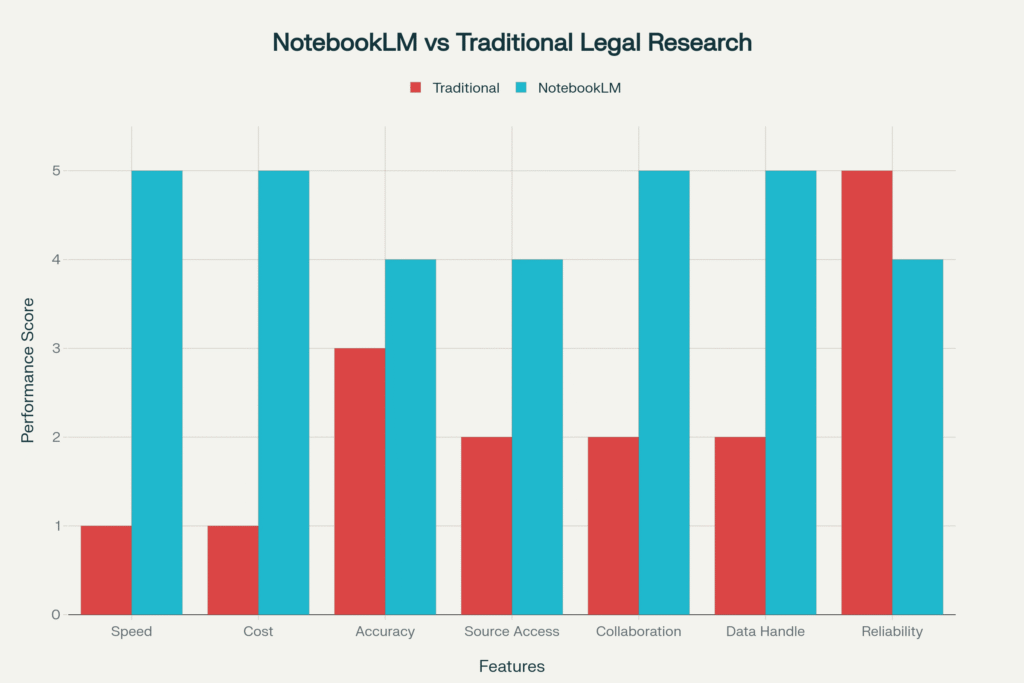
- Reducing review time by up to 90% for case files and discovery
- Offering precise answers with citations to original documents
- Comparing contract versions and highlighting unusual clauses
- Helping create timelines and issue matrices for litigation prep
- Allowing collaborative knowledge sharing within legal teams
Step-by-Step Guide: Using NotebookLM for Lawyers
1. Set Up Your Account Securely
Use a Google Workspace or Enterprise account for client or sensitive files to ensure confidentiality and compliance.
Establish internal policies: always redact sensitive or privileged information unless explicitly approved for upload.
2. Create a Matter-Specific Notebook
Title it clearly (e.g., “Smith v. Jones – Discovery Notebook”).
Upload all relevant materials: pleadings, contracts, transcripts, evidence, statutes, memos, and related webpages.
3. Organize Your Sources
Group documents by type: “Pleadings,” “Case Law,” “Discovery,” etc.
Use clear file names, date tags, and matter codes to simplify navigation.
4. Run Initial Queries
Ask NotebookLM to summarize the matter in bullet points (parties, legal issues, key dates).
Generate timelines or issue lists directly from uploaded materials.
5. Produce Structured Outputs
Case Briefs: Facts, procedural posture, issues, and holdings.
Timelines: Chronological event lists with clickable citations.
Deposition Checklists: Questions generated from contradictions or missing details.
Contract Comparisons: Highlight differences in clauses or versions instantly.
6. Use Prompt Templates
Examples:
- “Summarize this uploaded judgment into a one-page case brief.”
- “Create a chronological timeline of events from these pleadings and emails.”
- “Generate 10 deposition questions for the plaintiff, citing specific evidence.”
7. Collaborate and Share
Invite your team to view or edit notebooks via Google Workspace.
Build firm-wide knowledge bases, templates, and precedent libraries.
8. Verify and Export
Always verify AI-generated insights with original documents.
Export drafts, timelines, or summaries into your case management system or Google Docs.

Key Use Cases for NotebookLM in Law Practice
Case File Analysis and Discovery Review
Upload pleadings, discovery documents, and evidence to quickly extract key themes and reduce manual review time.
Contract Analysis and Comparison
Highlight differences between versions, identify liability clauses, and flag unusual terms to save time during due diligence or negotiations.
Legal Research and Case Law Analysis
Upload case law, statutes, or scholarly articles to build focused research notebooks and query them for rapid insights.
Deposition Management
Summarize lengthy transcripts, identify contradictions, and extract key admissions with source-linked citations.
Knowledge Management
Create institutional knowledge bases to train junior lawyers and ensure consistent access to precedents and templates.
Best Practices for Using NotebookLM in Legal Settings
Start Small: Test with public documents before handling sensitive client files.
Be Specific: Use precise instructions for better outputs.
Stay Ethical: Maintain human oversight, verify all citations, and follow professional responsibility guidelines.
Ensure Compliance: Always use Workspace or Enterprise accounts for client-related materials.
Law firms adopting NotebookLM early can:
Save significant time and costs on legal research and review
Improve client service through faster turnaround times
Retain institutional knowledge and train staff more effectively
In a competitive legal marketplace, AI-enhanced workflows are no longer optional—they’re essential.

Conclusion: Transform Your Legal Practice with NotebookLM
NotebookLM for Lawyers is more than a note-taking app—it’s a powerful, source-grounded AI research assistant designed to transform legal workflows. By adopting this tool, law firms can cut review times, improve accuracy, and unlock new efficiencies while maintaining compliance with ethical and confidentiality standards.
Whether you’re a solo practitioner or part of a large firm, NotebookLM offers a scalable solution to manage your knowledge, streamline processes, and deliver better outcomes for clients.
Need Help Implementing AI Tools Like NotebookLM?
At Double Tick – Digital Marketing Agency, we specialize in helping professional service firms (including law agencies) harness the power of AI tools like NotebookLM. From strategy to implementation, we’ll guide you in using AI to improve efficiency, streamline workflows, and stay competitive.
📩 Contact us today to learn how we can help your law agency embrace AI-driven success!